 twichat
What Twitch publishes for Linux
Nothing, and that has never changed. Twitch’s download page lists mobile apps and TV apps; no entry covers a computer, on any system.
On Windows and macOS there was at least a desktop application, shut down on 30 April 2022. On Linux there was never anything to shut down. Those shutdowns are covered on the desktop app page.
Watching Twitch on Linux therefore means a browser, or software written by someone else.
The apps still recommended, but archived
The articles that rank best on this question have aged, and the projects they recommend have closed:
- GNOME Twitch: repository archived on 6 August 2024, read-only.
- Orion: repository archived on 16 May 2020.
These packages are sometimes still installable from distribution repositories, which keeps the confusion alive. An archived client receives no fixes: when Twitch changes its interfaces, nobody updates the program.
What is maintained today
| What you want | Tool | Status |
|---|---|---|
| Watch without installing anything | Firefox or Chromium on the Twitch website | The official route, on Linux too. |
| Follow chat, without video | Chatterino | Maintained, available as Flatpak and nightly builds. |
| Send a stream to mpv or VLC | Streamlink | Command-line tool, maintained. No chat. |
| The same with a graphical interface | Streamlink Twitch GUI | In maintenance since July 2025: critical and dependency fixes only. |
| Chat and video in one application | Twichat | AppImage, deb and rpm, in x64 and ARM64. In alpha. |
None of this software is published by Twitch. All of it connects through public interfaces, and a channel’s rules, such as subscriber-only chat, apply exactly the same way.
Twichat on Linux
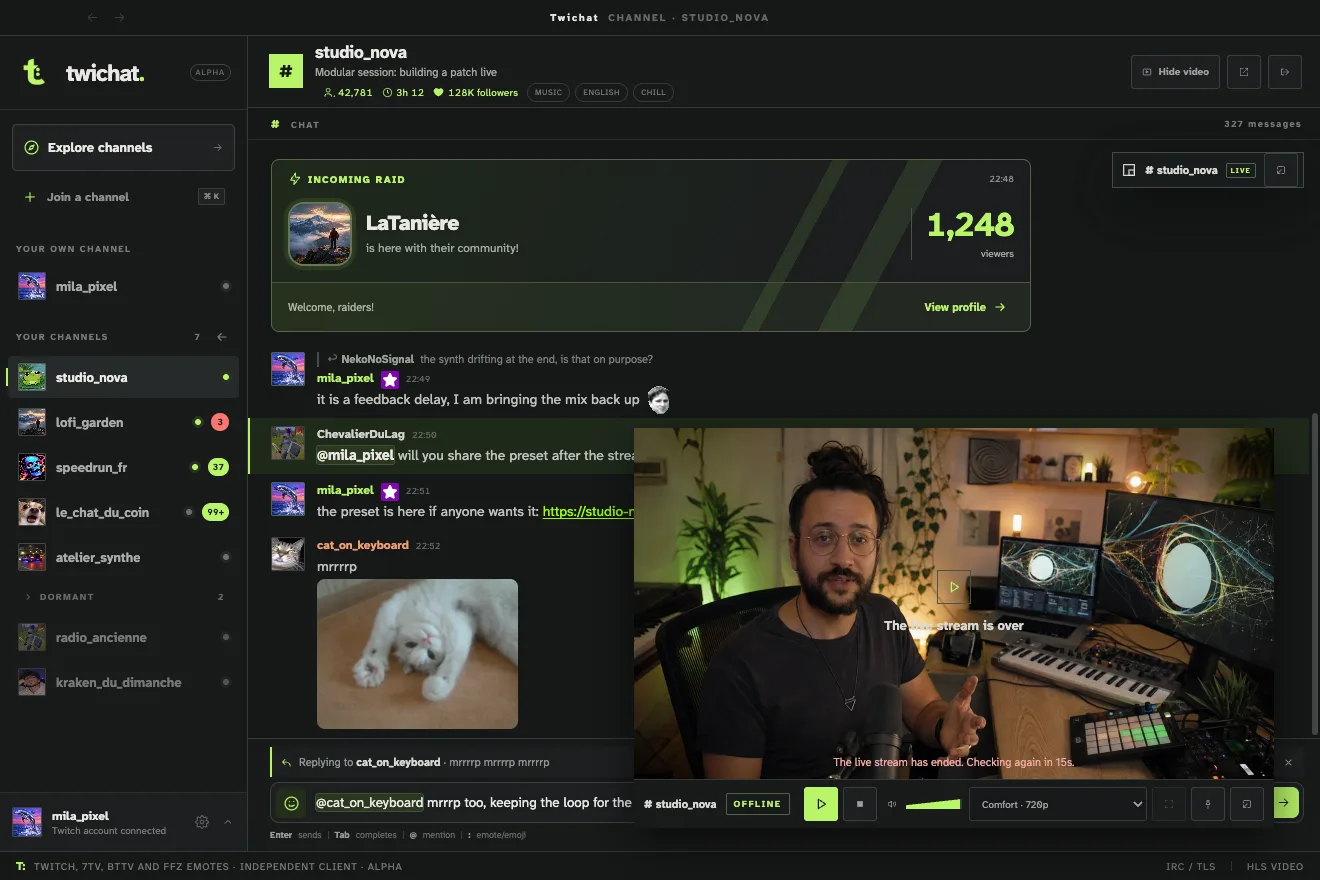
Twichat is a free and open-source desktop application that keeps chat and video in the same window, in the proportions you choose, or with the player detached onto a second monitor. Up to a hundred channels can stay open, with a single active video stream. Twitch, 7TV, BetterTTV and FrankerFaceZ emotes are built in, with no extension to install.
Six packages are published: AppImage, deb and rpm, each in x64 and ARM64. Choosing a format and installing it are covered in the Linux installation guide.
It is alpha software, written by one person. It has no whispers and no transparent overlay over a game.
On a modest machine or an ARM board
Twichat does not open Twitch’s web page. Chat runs over a single TLS IRC connection shared by every open channel. Each channel keeps its last five hundred messages, and only those on screen exist in the rendered document: keeping ten channels open is not the same as keeping ten pages open.
Video can shrink, detach, or drop entirely in favour of audio only. On an ARM board or an older computer, following a channel while listening then costs noticeably less than a browser tab on the website.
These numbers describe how the application works, not a measurement on your hardware. ARM64 packages exist, but the application is in alpha and is not validated on every board.
What this page does not cover
Broadcasting from Linux is a different task, handled by broadcasting software such as OBS Studio rather than a viewing client. The BetterTTV and FrankerFaceZ browser extensions remain available if you would rather stay on the Twitch website.