 twichat
What Twitch offers on desktop today
Nothing. Twitch’s download page lists mobile apps for Android, iOS and Meta Quest, then TV apps for Fire TV, PlayStation, Xbox, NVIDIA Shield, Chromecast and Apple TV. No entry covers Windows, macOS or Linux.
Two desktop programs existed, and both are gone:
- The Twitch desktop app, released in 2017 and built on the Curse client, shut down on 30 April 2022. The deprecation notice still sits at the top of the post that announced it.
- Twitch Studio, the in-house broadcasting software, followed on 30 May 2024, its download links removed.
Watching Twitch on a computer therefore means a browser, or an application written by someone other than Twitch.
Which application fits what you do?
| What you want | Tool | Keep in mind |
|---|---|---|
| Watch a channel without installing anything | The Twitch website in a browser | The only official route. Every account feature is there, subscriptions and bits included. |
| Follow several chats at once | Chatterino or Chatty | Both show chat only, with no video. |
| Keep chat and video in one application | Twichat | macOS, Windows and Linux. Still in alpha. |
| Send a stream to your own video player | Streamlink | Opens the stream in VLC or mpv from the command line, without chat. |
| Broadcast your own gameplay | OBS Studio | This is the kind of software Twitch pointed Twitch Studio users toward. |
None of these applications is published by Twitch. They connect through its public interfaces, and a channel that restricts chat to subscribers restricts it in these applications too.
Beware of old installers
Download sites still offer the installer for the discontinued app, sometimes presented as a current release. That program is no longer maintained, no longer updated and no longer distributed by Twitch: nothing guarantees the file on offer is the original one.
If a site offers you “the Twitch app for PC”, check who publishes it first. For Twichat, the published files and their SHA-256 checksums are on the repository’s releases page.
Twichat: chat and video in one window
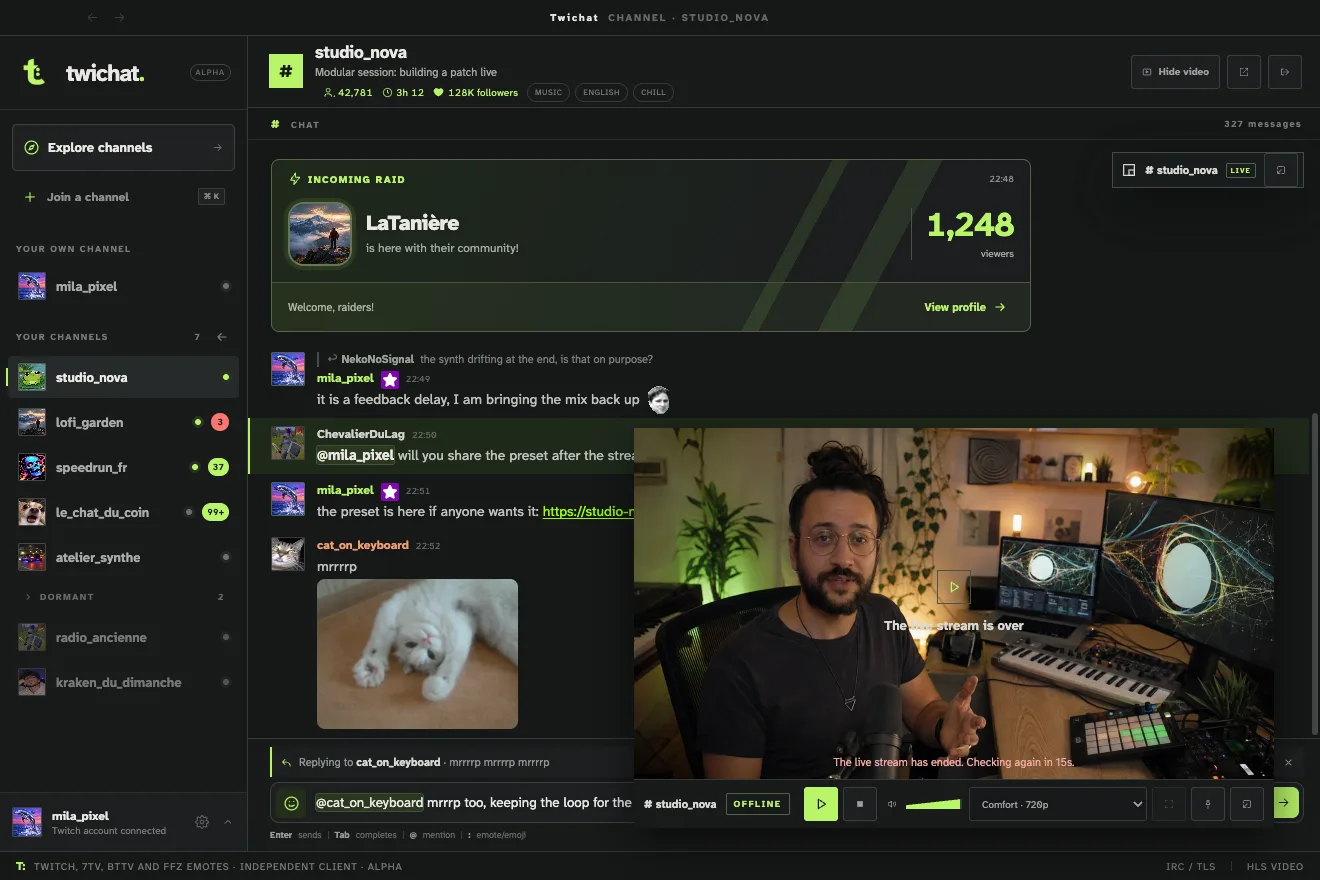
Twichat is a free and open-source desktop application for macOS, Windows and Linux. It puts back together what the browser separates: video on one side, chats on the other, in the proportions you choose, or the player detached into its own window on a second monitor.
What it does:
- Up to a hundred channels open at once, with a single active video stream.
- Twitch, 7TV, BetterTTV and FrankerFaceZ emotes are built in, with no extension to install.
- An anonymous mode reads chats without connecting an account. A Twitch account is still required to write.
What it does not do: no whispers, no transparent overlay over a game, and no attempt to bring back what Twitch’s old application did. It is alpha software, written by one person.
If you only want the chat
Chatterino and Chatty are two desktop chat clients, both older and more established than Twichat. Chatterino shows several chats side by side in columns. Chatty, written in Java, is known for its moderation tools. Neither displays video: they sit next to your browser or on a second monitor.
If you stay on the Twitch website, the BetterTTV and FrankerFaceZ browser extensions add emotes and settings to the existing chat without changing application.
What the old application used to do
The 2017 application was not only a viewer. It offered whispers, voice and video calls, chat rooms called “Servers”, friend synchronisation, a dark mode, and game mod management through CurseForge.
Today, whispers live on the Twitch website, mod management continued in the separately published CurseForge application, and the voice rooms have no replacement at Twitch. No third-party client provides them: those features are not open to outside applications.
What this page does not cover
Setting up a broadcast is a different task: it goes through broadcasting software, not a viewing client. On a phone, the Twitch app still exists and remains the normal route; Twichat cannot be installed on iPhone or Android.